Best OCR Software for Scanned Books in 2026: The Buyer's Shortlist
The best OCR software for scanned books is FixMyScan if you want to read and search the book on an e-reader: it crops, cleans and adds a hidden text layer to a whole book of up to 1,000 pages in one upload. ABBYY FineReader PDF leads on language count, Adobe Acrobat Pro suits people already paying for Acrobat, OCRmyPDF is the best free OCR software for scanned books, and Transkribus is the pick for handwriting.
Key takeaways
- FixMyScan is the one-step choice for scanned books you want to read on an e-reader. It adds searchable text while cropping and cleaning the pages, and keeps every page number.
- ABBYY FineReader PDF covers the most languages here: 198, with dictionary support for 53. It is a desktop app for Windows and Mac, priced from €69 a year on Mac.
- Adobe Acrobat Pro makes searchable PDFs on desktop and in the browser. It costs €24.19 a month on annual billing, so it suits people who already use Acrobat for other work.
- OCRmyPDF is free and open source and keeps the original pages. It runs from the command line and uses Tesseract, which lists 125 languages plus Fraktur, Latin and Ancient Greek.
- Transkribus is built for handwriting, which none of the others read well. Its free tier gives 50 credits a month, and a handwritten page costs 1 credit.
What OCR software for scanned books actually is (and what it is not)
A scanned book is a stack of photographs of pages. To a computer each page is a picture, so you can’t search it, copy a sentence from it or look up a word. OCR software (optical character recognition) reads the letters in each picture and turns them into text.
For books, the useful output is a searchable PDF. The recognised text is placed invisibly under each page image, word by word, so the page looks exactly as it was printed while search, copy, highlights and dictionary look-up work. This matters for long documents: a 400-page history without OCR can only be read front to back; with OCR you can jump to every mention of a name.
Book OCR has problems that office OCR doesn’t. Old paper scans grey or yellow. Print from earlier centuries uses the long s, ligatures and, in German books, Fraktur type. Pages tilt, the spine casts a shadow, and two pages often share one scan. Good results usually need clean, straight pages first, which is why some tools bundle clean-up with the OCR.
OCR software is not a scanner: it works on a scan you already have. It is not an EPUB converter either. Converting to EPUB throws away the page layout and keeps only the recognised text, mistakes included, while a searchable PDF keeps the page you can see and adds text underneath. And most OCR software is not handwriting recognition: printed text and handwriting need different tools.
How we ranked these OCR tools
- Whole-book OCR: can it process a full book in one job, not page by page?
- Original pages kept: do page numbers and layout still match the printed edition?
- Old and mixed scripts: does it handle Fraktur, Latin and Greek, as listed on its own pages?
- Clean-up included: does it straighten and clean pages, or only add text?
- Effort: browser, desktop app or command line.
- Price: as listed on each tool’s own page, checked 2 Nov 2026.
The best OCR software for scanned books in 2026
We read each tool’s own website, pricing page and documentation, and list only what those pages state. Where a page doesn’t say, we write “not checked”. The five tools below each lead for a different reader, from the person who wants to read a book on a Kindle to the archivist transcribing handwritten registers. Prices are in the currency each site showed when we checked, and we have not converted them.
1. FixMyScan, best for scanned books you want to read on an e-reader
FixMyScan adds OCR as one part of making a scanned book readable. You upload a scanned PDF or DjVu file of up to 1,000 pages and set one crop for the whole book. Every page is then cropped, straightened and cleaned: plain text pages become black on white, and pages with pictures stay in greyscale. Every page is read and the text is placed invisibly under the image.
The OCR covers 19 languages, including English, German, French, Latin, Italian and Spanish, plus old German Fraktur type and Ancient Greek mixed with Latin text, and the language is detected automatically. That covers the bulk of public-domain books in Western libraries, including the Fraktur and Greek-heavy grammars and classics that general OCR tools often struggle with.
Every page stays in its place, so page numbers and citations still match the printed book. The output is a standard PDF that opens on Kindle, Kobo, reMarkable, Boox, PocketBook and tablets, and clean black-and-white pages usually make a much smaller file than the grey scan you started with.
It runs in the browser with nothing to install. It does not read handwriting and does not export EPUB or Word. It costs $9.99 a week or $79.99 a year, with unlimited books under fair use of 5,000 pages a week, one book at a time.
Best suited for: readers who want a scanned book searchable and comfortable to read on an e-reader. It suits anyone who would rather upload once than install software and tune OCR settings.
2. ABBYY FineReader PDF, best for the widest language coverage on a desktop
ABBYY FineReader PDF is long-established desktop OCR software from ABBYY, a company headquartered in Austin, Texas, whose own page says it has been working for “over 35 years”. Its specifications list 198 OCR languages, 53 of them with dictionary support. Latin, Greek and “Old German” are on the list; Fraktur and Ancient Greek are not named.
It runs on Windows 11 and 10 (64-bit) and on Mac. On Windows, a Hot Folder feature can process files dropped into a folder automatically, according to its user guide. ABBYY’s FineReader 14 documentation describes deskewing; whether the current version still does, we have not checked. Cropping a whole book in one pass is not confirmed: an older community answer says crop is manual only, and that may be out of date.
Prices as shown on 2 Nov 2026: Standard for Windows €99 a year, €267 for three years or €16 a month; Corporate €165 a year; Mac €69 a year or €186 for three years, with no monthly plan. A 7-day trial needs no payment. Reviews: 4.5 out of 5 from 294 reviews on G2 and 4.7 from 451 on Capterra, both read from search snippets.
Best suited for: professionals who OCR documents in many languages and want a full desktop PDF editor. It suits Windows offices that can use Hot Folder for batches.
3. Adobe Acrobat Pro, best if you already pay for Acrobat
Adobe Acrobat Pro includes Scan & OCR, which adds a selectable text layer to a scanned PDF, according to Adobe’s help pages (read from a search snippet). It runs on desktop and in the browser. Adobe’s free online OCR also exists; it needs you to sign in to download, and no page or size cap is stated.
Adobe names English, German, Spanish, French, Portuguese “and more” for OCR, without a count. Users in Adobe’s community report deskewing through OCR and through the Enhance Scanned Document feature; that is a community report, not an Adobe statement. Whole-book cropping and whether page layout is kept: not checked.
Prices shown on 2 Nov 2026, including VAT: Acrobat Pro €24.19 a month on annual billing, €288.80 a year prepaid, or €36.29 month to month. Standard is €18.30 a month and Studio €30.49 a month on annual billing. There is a free trial of Pro; its length is not stated. G2 shows about 4.5 out of 5 from about 5,340 reviews for Adobe Acrobat as a whole (snippet), while Trustpilot shows 1.2 out of 5 from 7,570 reviews covering all of adobe.com.
Best suited for: people who already pay for Acrobat for editing, signing or forms. For them, OCR on scanned books costs nothing extra.
4. OCRmyPDF, best free OCR software for scanned books
OCRmyPDF is free, open-source software under the MPL-2.0 licence, and it does one job well: it adds an OCR text layer to an existing PDF so it can be searched and copied. Its introduction says it puts the text back into the original file and can produce a minimally altered PDF, so the page images and page numbers stay exactly as scanned. Output is PDF/A by default.
It uses the Tesseract engine, which lists 125 languages plus Fraktur, Latin and Ancient Greek; language packs are installed separately. It can straighten crooked pages as an option. It is a command-line program for Linux, macOS and Windows, with a Docker image that offers a web front end. On Windows it needs Tesseract and Ghostscript installed separately, according to its install guide.
The project has 35,209 stars on GitHub and released version 17.13.0 on 28 September 2026. Whether it crops margins or turns pages to clean black and white for reading: not stated on its pages, so not checked. In its minimally altered mode, grey pages stay grey.
Best suited for: technical users who want free, scriptable OCR and are comfortable in a terminal. It suits batch jobs and archives that must keep original page images untouched.
5. Transkribus, best for handwritten books and registers
Transkribus is the specialist on this list: it is built to recognise handwriting, from letters and diaries to parish registers, which ordinary book OCR doesn’t read. It runs in the browser, with an API on Scholar plans and above, and it is run by READ-COOP SCE, a European cooperative founded in 2019 in Innsbruck (per a University of Innsbruck announcement, read from a snippet).
Its searchable-PDF output keeps the original image underneath and adds an invisible text layer, so page layout is preserved. Transkribus says it covers more than 100 languages and scripts, and claims over 98% accuracy on print; both figures are its own. Whole-book cropping and deskewing: not stated.
The free tier gives 50 credits a month with no card, and handwritten text recognition costs 1 credit per page, so about 50 handwritten pages a month for free. Paid plans, including 20% Austrian VAT: Scholar €99 a year with 900 credits, Team €449 a year with 1,500 credits and 5 seats, and a 250-credit top-up for €59.50. The FAQ on the same page shows different Scholar and Team prices, so check the page before buying.
Best suited for: genealogists, historians and archivists working with handwritten material. It suits projects where handwriting matters more than reading comfort on an e-reader.
Side-by-side comparison
The same criteria as above: Fraktur listed among the languages, original pages kept, clean-up included, and the listed price.
| Tool | Fraktur listed | Original pages kept | Clean-up included | Price |
|---|---|---|---|---|
| FixMyScan | ✓ | ✓ | ✓ | $9.99 a week |
| ABBYY FineReader PDF | – | not checked | not checked | From €69 a year (Mac) |
| Adobe Acrobat Pro | not checked | not checked | not checked | €24.19 a month, annual |
| OCRmyPDF | ✓ | ✓ | not checked | Free |
| Transkribus | not checked | ✓ | not checked | 50 free credits a month |
✓ yes · – no · “not checked” means the tool’s own page doesn’t confirm it. Checked 2 Nov 2026.
Which OCR tool fits your use case
| If you… | Pick | Why |
|---|---|---|
| want to read and search a scanned book on an e-reader | FixMyScan | OCR, crop and clean-up in one upload, pages kept |
| OCR documents in dozens of languages at work | ABBYY FineReader PDF | 198 languages on desktop |
| already pay for Acrobat | Adobe Acrobat Pro | Scan & OCR is included |
| want free OCR and can use a terminal | OCRmyPDF | Free, keeps the original file |
| have handwritten letters or registers | Transkribus | Built for handwriting |
What results look like
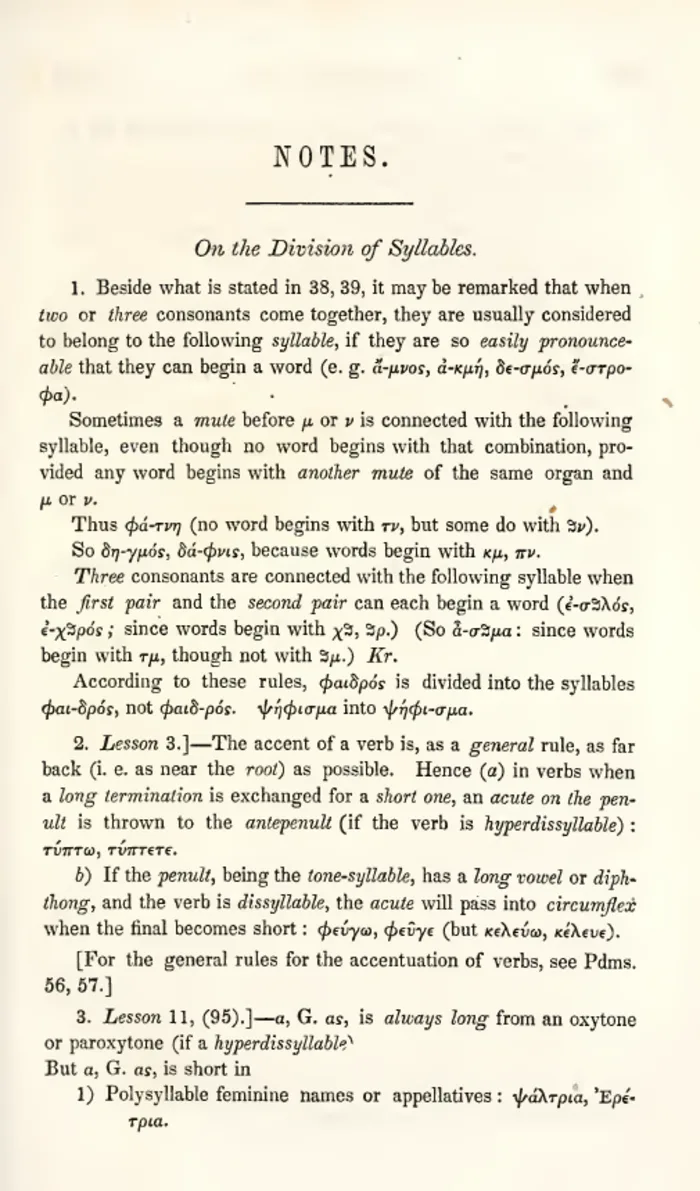 As scanned
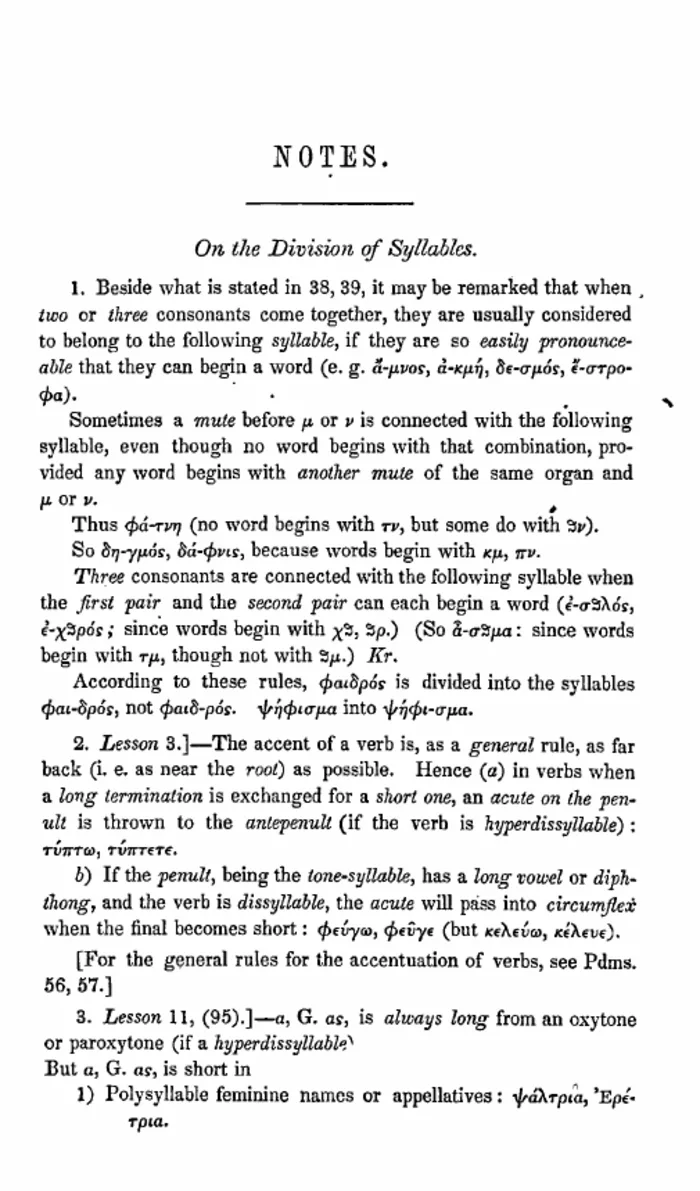 After FixMyScan
A page of grammar notes mixing Greek and English, before and after FixMyScan.
The page on the right is cleaner to read, but the bigger change is invisible: both the English and the Greek words now sit in a hidden text layer, so the book can be searched. More pages are on the samples page.
FAQ
What is the best OCR software for scanned books?
For a book you want to read and search on an e-reader, FixMyScan, because it does the OCR together with the crop and clean-up. For the most languages on a desktop, ABBYY FineReader PDF; for free, OCRmyPDF.
How can I OCR a book for free?
Install OCRmyPDF and run it on the PDF; it is free and keeps the original pages.
What is OCR and how does it work on a scanned book?
OCR, optical character recognition, reads the letters in a page image and turns them into text. In a searchable PDF that text sits invisibly under the image, so the page looks the same but search and copy work.
How do I add OCR to a scanned PDF?
Open it in an OCR tool and save a searchable PDF: upload it to FixMyScan, use Scan & OCR in Adobe Acrobat, or run OCRmyPDF from the command line. Clean, straight pages give better results than grey, tilted ones.
Which OCR software handles old German Fraktur?
FixMyScan reads Fraktur and detects it automatically. OCRmyPDF can read it through Tesseract's Fraktur language pack. ABBYY lists "Old German" but does not name Fraktur on its specifications page.
Can OCR software read handwriting?
Most book OCR reads printed text only, including FixMyScan. For handwritten letters, registers and notes, use a handwriting tool such as Transkribus.
Does OCR change the pages of my book?
It doesn't have to. FixMyScan, OCRmyPDF and Transkribus keep the original page images and add text under them, so page numbers still match the printed book.
What is the best OCR software for a Mac?
ABBYY FineReader PDF has a Mac version at €69 a year, and OCRmyPDF runs on macOS from the command line. FixMyScan runs in any browser, so it works on a Mac with nothing to install.
Try FixMyScan on your own book
Pick the scanned book you can't search. Upload it as a PDF or DjVu file. Set one crop for the whole book. Download a PDF with clean pages and a hidden text layer under every one. Make your book searchable now.