Best Online Scanned Book Cleaner in 2026: The Buyer's Shortlist
The best online scanned book cleaner is FixMyScan, because it does the whole job on a whole book in one browser upload: crop, straighten, white pages with black text, and searchable text, for up to 1,000 pages. Sejda, PDF24, iLovePDF and Smallpdf are general online PDF toolkits that each do part of the clean-up, one tool and one upload at a time, within their own limits.
Key takeaways
- FixMyScan is the only tool here built for whole scanned books. One upload crops, straightens, whitens and adds searchable text to up to 1,000 pages, keeping every page in place.
- Sejda crops every page at once, straightens pages and adds OCR in the browser. Its free tier stops OCR at 10 pages and files at 50 MB, so books need a paid pass from €5.50 a week.
- PDF24 is free and ad funded, with no registration. Its OCR can straighten pages, and it deletes files after one hour.
- iLovePDF has the biggest review base: 4.9 out of 5 from 14,033 reviews on Trustpilot. Its free OCR allows 1 task of up to 15 MB.
- Smallpdf crops one page or all pages and makes searchable PDFs in the browser. Its prices didn't load on its own page when we checked, so we don't quote one.
What an online scanned book cleaner actually is (and what it is not)
An online scanned book cleaner is a website that improves the pages of a scanned PDF without anything to install. You upload the file, the work happens on the tool’s servers, and you download the result.
For a book, cleaning means four jobs. Cropping removes the margins, the dark scanner edge and the spine shadow, so the text fills an e-reader screen. Straightening (deskewing) levels tilted pages. Whitening turns yellow or grey paper white and faint text black, which is what e-ink shows best. OCR adds an invisible text layer so you can search, highlight and look words up.
Most online PDF sites were built for office documents: a contract, a form, a few pages. They offer each job as a separate tool, often with free limits measured in pages or megabytes that a 300-page book quickly passes. A book-focused cleaner does all four jobs in one pass across every page.
An online cleaner is not a desktop app: the file leaves your computer, so how long the site keeps it matters. It doesn’t scan the book; you need the scan first. It doesn’t rescue a blurred or very low-resolution scan. And cleaning isn’t converting: a cleaned book stays a PDF with its original pages, rather than being rebuilt as an EPUB.
How we ranked these online cleaners
- Whole book in one pass: does one crop or setting apply to every page?
- Straightening: does it deskew tilted pages?
- Searchable text: does it add OCR, and what are the free limits?
- File retention: how long the site says it keeps your upload.
- Price: as listed on each tool’s own page, checked 2 Nov 2026.
The best online scanned book cleaners in 2026
We read each tool’s own feature and pricing pages and list only what they state, writing “not checked” where they don’t say. All five run in a browser. FixMyScan comes first because it is built for whole books; the other four are general PDF toolkits, ordered by how much of a book’s clean-up they cover. Prices are in the currency each site showed, and we haven’t converted them.
1. FixMyScan, best for cleaning a whole scanned book in one upload
FixMyScan is made for one kind of file: a scanned book. You upload a PDF or DjVu of up to 1,000 pages and draw one crop on a sample page; it applies to the whole book, so margins, scanner edges and spine shadows go everywhere at once. Two-page spreads can be split at the fold.
Every page is then cleaned. Slightly tilted pages are straightened. Plain text pages are turned to pure black and white, which darkens faint print and removes grey or yellow paper; pages with illustrations or photos stay in greyscale, so the pictures survive. Each page gets a hidden text layer in one of 19 languages, including English, German, French, Latin, Italian and Spanish, plus Fraktur and Ancient Greek mixed with Latin, detected automatically.
Nothing is reflowed, so every page stays in its place and page numbers still match the printed book. Clean black-and-white pages usually make a much smaller file than the grey scan, which helps when sending to a Kindle by email, where Amazon’s limit is 50 MB.
Your files are private to your account, and every upload is deleted 24 hours after the book is ready. It costs $9.99 a week or $79.99 a year, with fair use of 5,000 pages a week, one book at a time.
Best suited for: anyone with a whole scanned book to clean for reading or searching. It suits people who want one upload instead of a chain of separate tools.
2. Sejda, best general toolkit for books that fit its limits
Sejda is a browser PDF toolkit from Sejda BV in Amsterdam, founded in 2010 as an open-source project. Three of its tools cover most of book clean-up: Crop can auto-crop and apply the same crop to every page; Deskew straightens pages automatically or one at a time; and OCR lays invisible text over the original images, keeping the pages as they were.
Each is a separate upload. Whether it turns pages to pure black and white: not checked.
The free tier allows 3 tasks an hour, 30 files an hour and 50 MB per file, and OCR is capped at 10 pages. Its crop and deskew pages show conflicting page caps, so we don’t quote one. Paid plans raise files to 500 MB and OCR to 100 pages per document: Web Week Pass €5.50 for 7 days, Web Monthly €8.50 a month, or Desktop+Web Annual €71 a year, which adds a desktop app that works on your own computer.
Even on a paid plan, OCR stops at 100 pages per document, so a long book needs splitting first. It rates 4.1 out of 5 from 103 reviews on Trustpilot.
Best suited for: short books, chapters or articles under its page caps. It suits people who want a capable browser toolkit and don’t mind several uploads.
3. PDF24, best free option with no account
PDF24 is a free, ad-funded PDF toolkit from Geek Software GmbH, with no paid tier and no registration. Its OCR tool can straighten pages as part of recognition, and outputs a searchable PDF or PDF/A. The OCR page lists many languages without giving a count.
Its crop tool sets margins by hand or in a visual mode; automatic detection isn’t mentioned, and whether one crop applies across every page we haven’t checked. Black-and-white conversion: not checked. PDF24 advertises “no limits”; we haven’t tested a real maximum size or page count.
It says files are deleted after one hour. The OCR page says OCR runs on PDF24’s servers in Germany and also that it “runs in your browser”, which conflicts. A desktop app, PDF24 Creator, is available for Windows only. It rates 4.1 out of 5 from 18 reviews on Trustpilot.
Best suited for: people who want free OCR and straightening without signing up. It suits one-off jobs where you check the result page by page.
4. iLovePDF, best known online PDF toolkit
iLovePDF has offered online PDF tools since 2010 from Barcelona, and it has the largest review base here: 4.9 out of 5 from 14,033 reviews on Trustpilot. Its crop tool lets you drag a box and apply it to all pages or the current page, and it has an OCR tool with about 119 languages in its selector.
Deskew isn’t mentioned in its feature list, and the OCR page doesn’t describe its output in detail; black-and-white conversion is not checked. On the free plan, OCR allows 1 task of up to 15 MB, and the period for task counts isn’t stated. A 15 MB cap rules out most scanned books, which are often far larger.
Premium costs €5 a month billed annually (€60 a year) or €9 billed monthly. It works in the browser and on iOS and Android, with Mac and Windows desktop apps on paid plans.
Best suited for: people who already use iLovePDF for everyday PDF jobs and want a quick crop. It suits small files rather than whole books.
5. Smallpdf, best for a quick crop on a short document
Smallpdf is a Swiss online PDF toolkit, operating “since 2013” according to its pricing page. Its crop tool works on a single page or all pages by dragging, and its OCR tool produces searchable PDFs in “many languages”, with no count given.
Deskew and black-and-white conversion: not checked. Free tools have daily download limits, and there is a 7-day Pro trial; neither number is stated. Its pricing page loads prices by script, and none came through when we checked, so we don’t quote a price.
Smallpdf says files are deleted after one hour unless you save them. It works in the browser and in a mobile app. It rates 4.8 out of 5 from 5,419 reviews on Trustpilot.
Best suited for: cropping or OCRing a short document in a hurry. It suits people already on a Smallpdf plan.
Side-by-side comparison
The same criteria as above: one crop for every page, straightening, searchable text, and the listed price.
| Tool | Crops every page | Straightens | Searchable text | Price |
|---|---|---|---|---|
| FixMyScan | ✓ | ✓ | ✓ | $9.99 a week |
| Sejda | ✓ | ✓ | ✓ 10 pages free | €5.50 a week |
| PDF24 | not checked | ✓ | ✓ | Free |
| iLovePDF | ✓ | not checked | ✓ 1 task free | €5 a month, annual |
| Smallpdf | ✓ | not checked | ✓ | not checked |
✓ yes · – no · “not checked” means the tool’s own page doesn’t confirm it. Checked 2 Nov 2026.
Which online cleaner fits your use case
| If you… | Pick | Why |
|---|---|---|
| want a whole scanned book clean and searchable | FixMyScan | All four jobs in one upload, up to 1,000 pages |
| have a chapter or article under 100 pages | Sejda | Crop, deskew and OCR, paid pass by the week |
| want free OCR with no account | PDF24 | Free, ad funded, deskew in OCR |
| already use iLovePDF | iLovePDF | Familiar crop and OCR tools |
| need a fast crop on a few pages | Smallpdf | Crop one or all pages in the browser |
What results look like
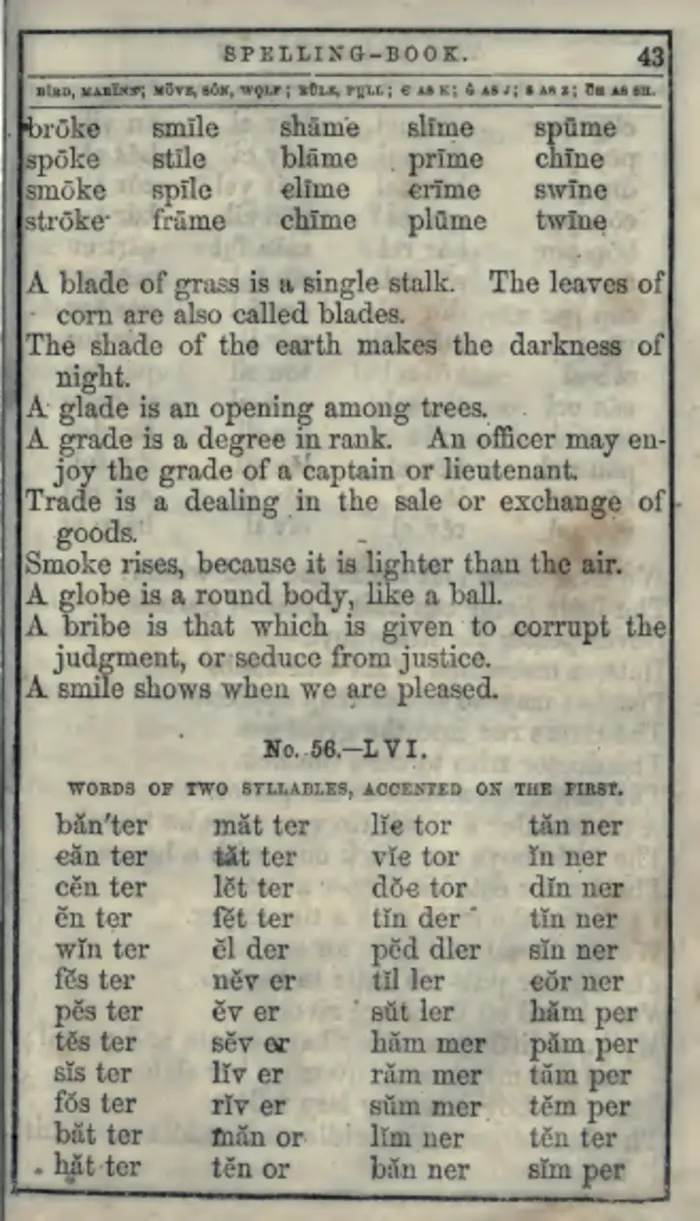 As scanned
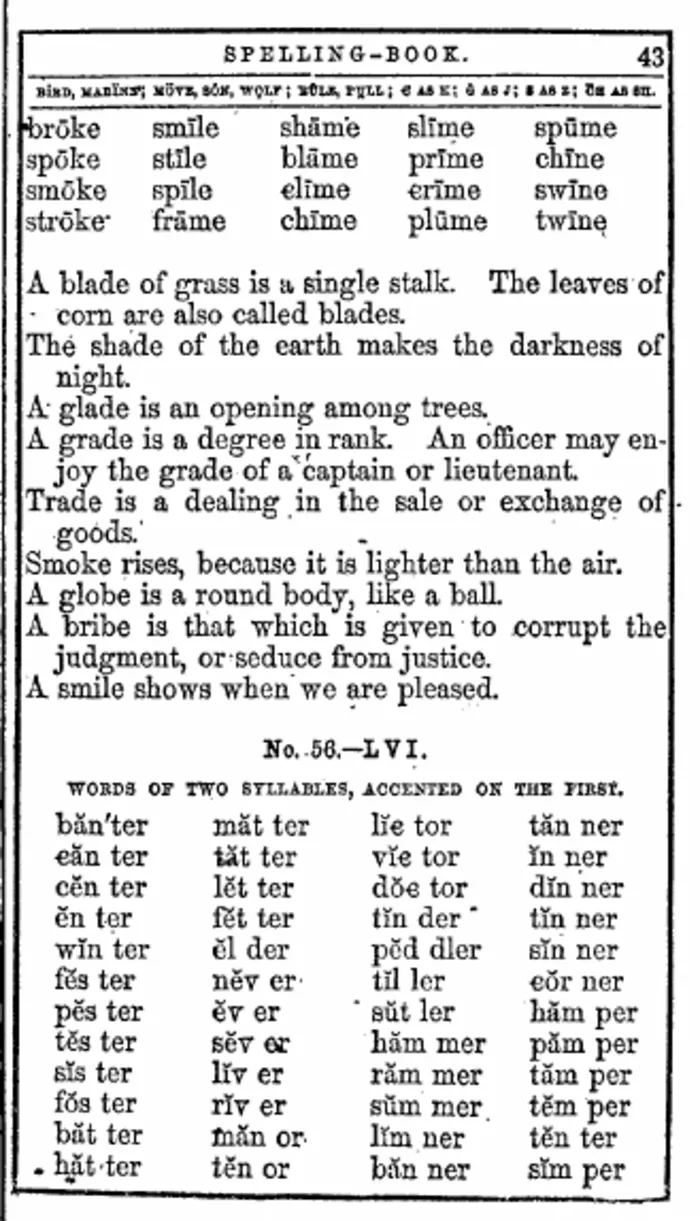 After FixMyScan
A stained page from an old spelling book, before and after cleaning.
The stain and grey paper are gone, the columns stand out in black, and the page carries searchable text underneath. More pairs are on the samples page.
FAQ
How do I clean up a scanned PDF online?
Upload it to a browser tool that crops the margins, straightens the pages and turns them black and white, then adds OCR. FixMyScan does all of that in one upload; general PDF sites need a separate tool for each step.
How do I remove the grey background from a scanned PDF?
Use a tool that levels the paper to white and the text to black. FixMyScan does this on plain text pages and keeps pictures in greyscale; general darken or contrast tools change the whole page at once.
How do I crop multiple pages in a PDF at once?
Use a crop tool that applies one box to every page: FixMyScan, Sejda, iLovePDF and Smallpdf all offer that. Check pages near the spine, where left and right margins differ.
Is it safe to upload a scanned book to an online tool?
Check how long each tool keeps your file. PDF24 says it deletes files after one hour, Smallpdf after one hour unless saved, and FixMyScan 24 hours after the book is ready.
Is there a free online scanned book cleaner?
PDF24 is free and ad funded. Sejda and iLovePDF have free tiers with tight OCR limits.
Can an online tool make a scanned book searchable?
Yes. OCR adds invisible text under each page. Free tiers often cap it, for example Sejda at 10 pages and iLovePDF at 1 task of 15 MB.
Can I make PDF text darker online?
Turning text pages to pure black and white is the reliable way to darken faint print on a scan. FixMyScan does it for every plain text page in the book.
Which online cleaner keeps my page numbers?
Tools that crop and clean without reflowing keep every page in place. FixMyScan keeps every page; Sejda says its OCR overlays the original images.
Try FixMyScan on your own book
Open the grey, crooked scan you've been putting off. Upload the PDF or DjVu, up to 1,000 pages. Set one crop for the whole book. Download it clean, straight and searchable. Clean your book now.