Best Book Scanning App or Service in 2026: The Buyer's Shortlist
Scanning a book is two jobs: capturing the pages, then making the file readable. FixMyScan is our pick for the second job, the one most book scanning apps and services leave half done: it turns any finished scan into a cropped, clean, searchable PDF for an e-reader. For the capture itself, vFlat is the phone app, 1DollarScan the mail-in book scanning service, and ScanTailor Advanced and ScanTailor Spectre the free desktop finishers.
Key takeaways
- FixMyScan doesn't scan; it finishes. Upload the PDF from any app, scanner or service and get back a cropped, black-and-white, searchable PDF of up to 1,000 pages.
- vFlat is a phone app that flattens curved pages, removes fingers and splits two-page spreads. It is free to download, with text recognition sold in page packs from $2.49 for 200 pages.
- 1DollarScan scans books you mail in for $1.20 per 100 pages, plus $1.00 per 100 pages for OCR. The book is cut apart and recycled unless you pay for a return exception.
- ScanTailor Advanced is free desktop software that splits, straightens and crops your own captures. It has no OCR, so it needs a second tool for searchable text.
- ScanTailor Spectre is a free Mac app, Apple Silicon only, that adds an invisible text layer using Apple's own recognition. It is a beta release.
What a book scanning app or service actually is (and what it is not)
A book scanning app or service turns a printed book into a digital file, usually a PDF. There are three ways to do it. A phone app photographs each spread and corrects the curve of the pages. A flatbed or overhead scanner at home captures each page with the book open. A mail-in service receives the book, usually cuts off the spine, and feeds the loose pages through a sheet scanner.
Each route gives you the same raw result: a stack of page images. Those images carry everything the camera saw: margins, the dark edge of the scanner, the shadow of the spine, yellowed paper, and sometimes two pages in one image. Read on a computer, that is fine. Read on a 6 to 10-inch e-reader, the whole page shrinks to fit, so the text comes out small and grey, and you can’t search it unless OCR was added.
So scanning has a second half: finishing. Finishing means cropping the margins, splitting two-page spreads, straightening tilted pages, turning grey paper white and text black, and adding a hidden text layer. Some apps and services do part of this; desktop tools do most of it if you have the time.
A book scanning app is not a library. If the book is old, look first in a library archive such as Internet Archive or HathiTrust: someone may already have scanned it. It is not an e-reader converter either. Turning a scan into EPUB means re-typing it by OCR, mistakes included, while a finished PDF keeps every page as printed.
How we ranked these apps and services
- What it does to your book: does the book survive scanning?
- Two-page spreads: can it split an open-book capture into single pages?
- Searchable text: does the result carry OCR text, and at what cost?
- E-reader ready: is the output cropped and clean enough for e-ink?
- Effort: phone, desktop software or a parcel in the post.
- Price: as listed on each product’s own page, checked 2 Nov 2026.
The best book scanning apps and services in 2026
We read each product’s own website, store page or pricing page and list only what those pages state, with “not checked” where they don’t say. The list mixes apps, a service and free software, because the right choice depends on how many books you have, whether you can part with them, and what you want to read them on. FixMyScan comes first because it is the step every other option still needs before the book reads well on an e-reader. Prices are in the currency each site showed.
1. FixMyScan, best for finishing a scan you already have
FixMyScan does not capture pages. It takes the PDF or DjVu file that a phone app, a home scanner, a scanning service or a library archive produced, up to 1,000 pages, and finishes it for reading.
You set one crop for the whole book. If the book was scanned open, two pages per image, the spreads are found and split at the fold, left page first, and you can move the fold line before it runs. Tilted pages are straightened. Plain text pages turn black on white, while pages with pictures stay in greyscale. Every page is read, and the text goes invisibly under the image, in English, German, French, Latin, Italian or Spanish, plus Fraktur and Ancient Greek mixed with Latin.
The result is one PDF with every page in its original order, cropped so the text fills more of an e-reader screen. Clean black-and-white pages usually make a far smaller file than a grey scan, which matters for Amazon’s 50 MB email limit for Kindles. Books that read right to left come out in the wrong order when split, so switch splitting off for those.
It costs $9.99 a week or $79.99 a year, with unlimited books under fair use of 5,000 pages a week, one book at a time.
Best suited for: anyone holding a scanned book that looks bad on their e-reader, whichever app or service made it. It suits people who want the finishing done in one upload rather than in desktop software.
2. vFlat, best phone app for scanning books yourself
vFlat is a scanning app for iPhone and Android, made by VoyagerX, built specifically for books. Its site lists the three things a book needs that a general document scanner doesn’t do: it flattens the curve of the pages near the spine, removes your fingers from the image when you hold the book open, and splits two-page spreads into single pages.
It recognises text in more than 100 languages, and scans are searchable inside the app. Whether it exports a searchable PDF is not mentioned on its site, so we have not checked it. It captures new photos; it does not take an existing PDF as input.
The app is free to download. Its App Store page lists subscriptions from about $3.99 to $4.99 a month or $35.90 to $39.99 a year, and text recognition packs of 200 pages for $2.49, 3,000 pages for $10 and 10,000 pages for $20. It rates 4.8 out of 5 from 6.3K ratings on the App Store; the Google Play listing didn’t load when we checked.
A phone capture is never quite as even as a flatbed: lighting and focus vary from page to page, so a finishing pass that crops and cleans the whole book evenly helps afterwards.
Best suited for: people scanning their own books at home who want to keep the book intact. It suits a few books at a time rather than a whole library.
3. 1DollarScan, best mail-in book scanning service
1DollarScan scans books you post to it. A one-time order costs $1.20 per set, where a set is 100 pages, rounded up. Options are priced per set: OCR $1.00, Express $2.00, High Quality Touch Up $2.00, 600 dpi $2.00, and Re-Scan Insurance $0.20. One-time orders take about 60 days without Express. Subscriptions run from $18.99 a month for 10 sets to $119.99 a month for 100 sets.
The High Quality Touch Up option straightens pages, covers OCR in more than 40 languages, and cuts file size by around 30%, according to the pricing page. Its free Fine Tune tool removes margins from its own files and optimises them for devices.
The catch is the book. According to its FAQ, the book is cut and recycled; a return exception costs $25 plus postage. Files are downloaded from your account. The company says it has operated in Silicon Valley since 2011, from Campbell, California. Its Trustpilot profile is unclaimed and has no reviews.
At these prices a 300-page book is three sets: $3.60 for the scan, $6.60 with OCR.
Best suited for: people with a shelf of books they are happy to give up and no time to scan them. It suits large batches where 60 days’ wait is acceptable.
4. ScanTailor Advanced, best free desktop tool for cleaning your own captures
ScanTailor Advanced is free, open-source software (GPL-3.0) for finishing raw book captures from a camera or scanner. It splits two-page scans, straightens tilted pages, selects the content area and sets margins automatically, and its README lists adaptive black-and-white output. Every stage can be corrected page by page.
Pre-built versions are listed for Linux and Windows; macOS isn’t listed for this fork. The latest release is v1.2.1 from 24 May 2026, and the maintained repository has 353 stars on GitHub. Its page describes it as merging two earlier forks, ScanTailor Featured and ScanTailor Enhanced.
It does not do OCR, and its output is page images meant to be assembled by other tools. To read the result on an e-reader you still build a PDF and add a text layer with a tool such as OCRmyPDF, a free command-line program.
Best suited for: people scanning their own books on Windows or Linux who want full control of every page. It suits careful work on a few important books.
5. ScanTailor Spectre, best free option for Mac users
ScanTailor Spectre is a newer fork for macOS, free under GPL-3.0. Unlike ScanTailor Advanced, it adds an invisible text layer itself, using Apple’s Vision text recognition with optional language settings; the number of languages isn’t stated.
It has a Select Content stage and an Auto Mode for cropping whole books, and it straightens pages, though its README notes that Auto Mode sets deskew to zero. It runs only on Apple Silicon Macs with macOS 15 or later, and the 2.0b7 release notes say macOS 15 has not been runtime-tested.
It is beta software: version 2.0b7 was released on 21 October 2026, and the repository was created in December 2025 and has 55 stars. Expect rough edges.
Best suited for: Mac users with Apple Silicon who scan their own books and want a free desktop finisher with text recognition. It suits people comfortable with beta software.
Side-by-side comparison
The same criteria as above: whether the book survives, two-page spread splitting, searchable text, and the listed price.
| Option | Book kept intact | Splits spreads | Searchable text | Price |
|---|---|---|---|---|
| FixMyScan | ✓ | ✓ | ✓ | $9.99 a week |
| vFlat | ✓ | ✓ | ✓ in the app | Free app, OCR from $2.49 per 200 pages |
| 1DollarScan | – | not checked | ✓ | $1.20 per 100 pages, OCR $1.00 |
| ScanTailor Advanced | ✓ | ✓ | – | Free |
| ScanTailor Spectre | ✓ | not checked | ✓ | Free |
✓ yes · – no · “not checked” means the product’s own page doesn’t say. FixMyScan works on your existing scan, so your book is never touched. Checked 2 Nov 2026.
Which book scanning option fits your use case
| If you… | Pick | Why |
|---|---|---|
| already have a scan that reads badly on your e-reader | FixMyScan | Crop, split, clean-up and OCR in one upload |
| want to scan a few books at home with a phone | vFlat | Flattens curves, removes fingers, splits spreads |
| have many books you can part with | 1DollarScan | Mail-in, priced per 100 pages |
| scan on Windows or Linux and want page-by-page control | ScanTailor Advanced | Free and hands-on |
| scan on an Apple Silicon Mac | ScanTailor Spectre | Free, with built-in text recognition |
What results look like
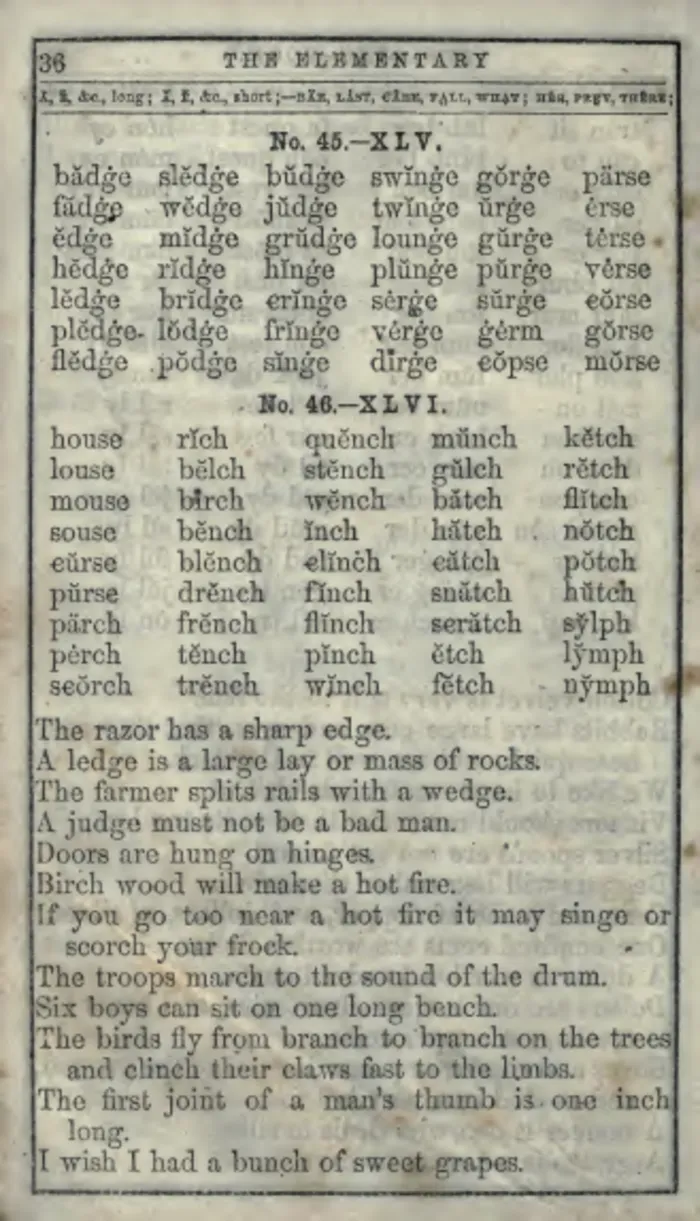 As scanned
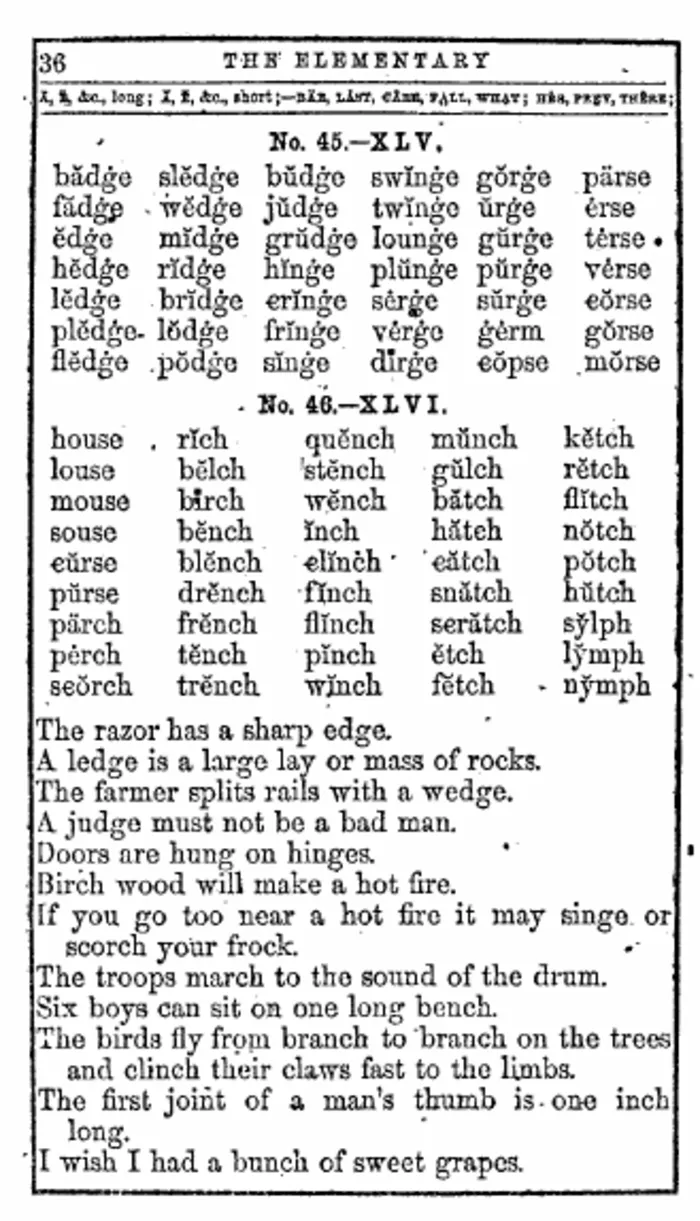 After FixMyScan
A stained page from an old spelling book: the raw scan, then the finished page.
This is the difference finishing makes to any scan, however it was captured. More pairs are on the samples page.
FAQ
What is the best app to scan a book with a phone?
vFlat is built for books: it flattens the curve of the pages, removes your fingers from the image and splits two-page spreads. It is free to download on iPhone and Android, with paid text recognition packs.
Is there a free book scanning app?
vFlat is free to download, though text recognition is sold in packs. On a computer, ScanTailor Advanced and ScanTailor Spectre are free for cleaning up captures.
How much does it cost to have a book scanned?
1DollarScan charges $1.20 per set of 100 pages, plus $1.00 per set for OCR, so a 300-page book is 3 sets: $3.60, or $6.60 with OCR. The book is cut and recycled unless you pay a $25 return exception plus postage.
Where can I get a book scanned to PDF?
A mail-in service such as 1DollarScan, a local print and copy shop, or yourself with a phone app or flatbed scanner. Before scanning, check whether a library archive already has the book.
How do I scan a book to PDF with my phone?
Use a book scanning app such as vFlat, keep the book flat and evenly lit, and shoot each spread straight on. Export the PDF, then crop, clean and add searchable text before reading it on an e-reader.
What is the best way to scan a book without destroying it?
Scan it yourself, with a phone app or a flatbed or overhead scanner, so the spine stays intact. Mail-in services that cut the spine give cleaner scans but don't return the book unless you pay extra.
Why does my scanned book look bad on a Kindle?
The Kindle shows each whole page, margins included, so the text is tiny, and grey paper looks faint on e-ink. Crop the margins, turn the pages black and white and add OCR before sending it.
Do I need OCR after scanning?
Only if you want to search, highlight, copy or look up words. Without OCR the pages are pictures; with it, invisible text sits under each page.
Try FixMyScan on your own book
Scan the book with whatever you have. Upload the PDF or DjVu to FixMyScan. Set one crop for the whole book. Download a clean, searchable PDF your e-reader can show at normal size. Finish your scan now.